Call Tracking and Conversion Tracking for Pest Control Companies
Pest control call tracking shows which marketing efforts produce real customer conversations, inspections, and completed jobs, not just clicks on a phone number. Start by connecting website forms, phone calls, advertising data, and your dispatch or customer relationship management (CRM) records. Then give each inquiry a consistent outcome. That is how an owner can judge lead quality without mistaking activity for revenue.

Key takeaways
- A tap on a phone link is not proof that a customer spoke with your office.
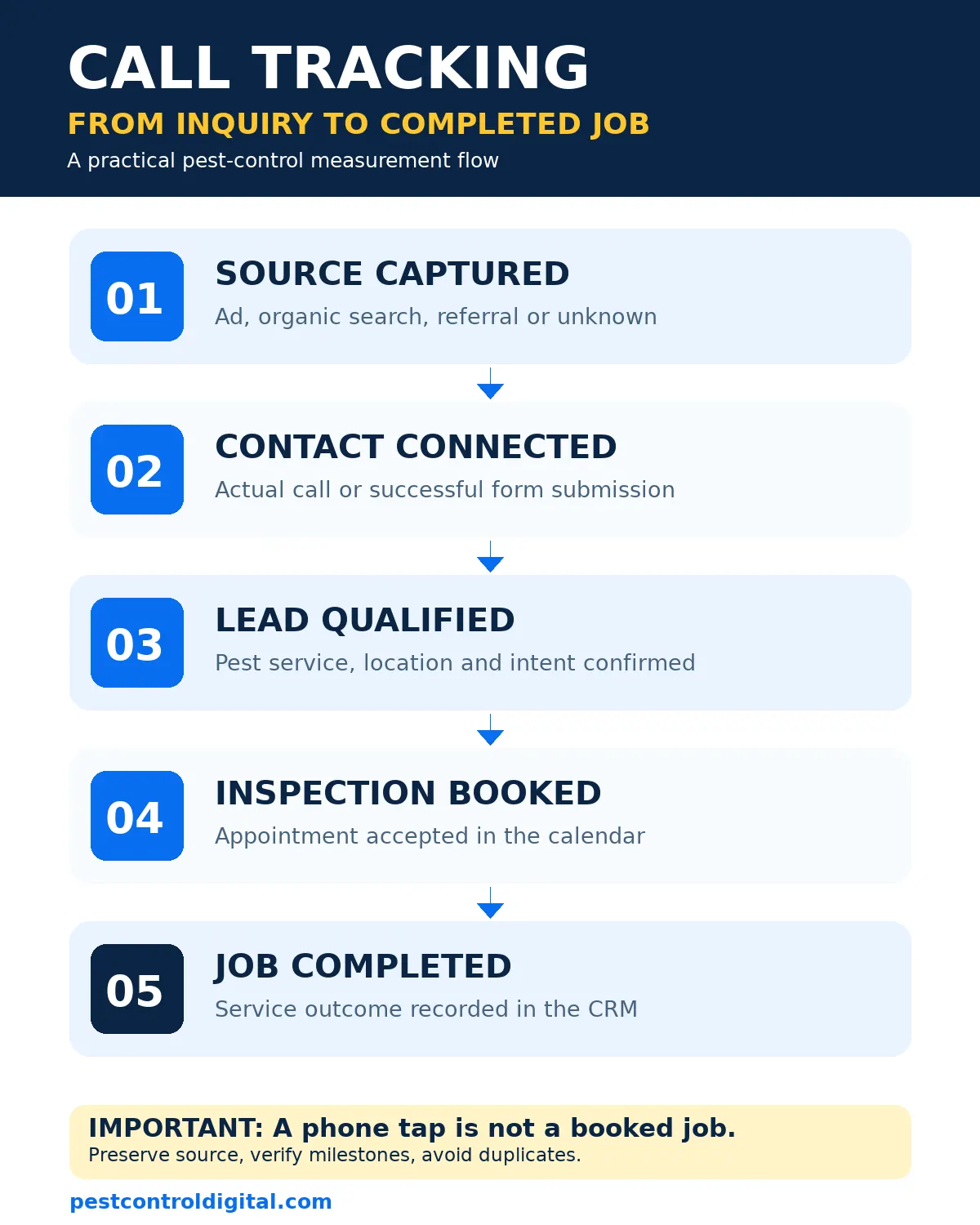
- Track the full path from source to qualified inquiry, booked inspection, and completed service.
- Use distinct lead statuses and a shared customer record to prevent double counting.
- Check consent, recording disclosures, and access controls before collecting call data.
- Review channel performance by service type and service area, not raw lead totals alone.
What should pest control call tracking actually measure?
A pest control owner needs answers to three questions: where did the inquiry come from, did it represent a serviceable job, and what happened next? Call tracking can connect an incoming call with a marketing source. Conversion tracking adds actions such as a completed form, qualified inspection request, appointment, or sale. Neither system knows automatically whether the caller needs a termite inspection or simply dialed the wrong number.
Separate a contact attempt from a lead. A mobile phone-link click records an intention to call. A connected call shows a conversation occurred. A qualified lead requires a person who needs a service you offer, in an area you cover, with enough information to proceed. An inspection booked is another step. A completed, paid visit is stronger business evidence.
Google distinguishes website phone-number clicks from calls measured using a forwarding number. Its phone call conversion tracking guidance says a mobile click can be measured even when the actual conversation is not. Treat that distinction as a reporting rule, especially for urgent rodent or bed bug inquiries.
Build a tracking flow from click to completed job
Begin with the channels that already bring inquiries: Google Ads, organic search, Google Business Profile, referral traffic, direct visits, and repeat customers. Preserve the landing page, source and campaign details where they are available and permitted. Do not guess the origin of an untracked phone call. Label it unknown rather than assigning it to whichever channel is being promoted that month.
Send calls and forms into one record with a stable identifier, date, pest service, location, source, and outcome. Keep the original source unchanged while logging later contacts separately.
Start with controlled lead statuses, then connect your call platform and scheduling system. Compare sources using our lead generation channel guide.
The useful end point is a job outcome. That does not mean every lead should become a sale. A homeowner outside your route, an existing customer requesting support, or an applicant calling about work must be classified correctly rather than counted as a failed new sale.
Which events belong in your tracking plan?
Build a measurement dictionary before installing another tag. Define each event, where it is recorded, who owns it, and whether it is a meaningful business outcome. Google Analytics recommends lead-generation events such as generate_lead, qualify_lead, working_lead, and close_convert_lead. These events require deliberate implementation; they do not appear just because a CRM exists.
| Event or status | What it means | Evidence and owner |
|---|---|---|
| Phone-link click | Visitor tapped a call link | Website tag; marketing team |
| Connected inbound call | Call reached the tracking or phone system | Call log; office manager |
| Form submitted | Valid request reached the business | Form success plus lead record; website team |
| Qualified lead | Service, location, and intent confirmed | CRM disposition; office team |
| Inspection booked | Appointment accepted and scheduled | Scheduling record; dispatcher |
| Job completed | Service performed and outcome recorded | Job record; operations team |
Use the official GA4 recommended events reference for event names and parameters. Do not fire generate_lead on every form-button click: validate a successful submission first. Likewise, do not send a “job completed” event when an inspection has only been scheduled. The landing-page guide explains why the form experience must support the measurement plan.
Choose call numbers and attribution carefully
Google Ads offers different methods for measuring calls from ads, calls to a number displayed on your website, and mobile phone-link clicks. Website call conversion tracking can use a Google forwarding number for visitors who arrive from an ad, subject to the product’s setup and availability. Call duration thresholds are configurable, but duration alone does not establish purchase intent. A long conversation about a service you do not provide is not a qualified lead.
Dynamic number insertion can associate calls with visits. Verify routing on mobile and desktop, and keep your actual business number consistent in public listings and structured data.
For Google Ads campaigns for pest control, review conversion goals before optimizing bids. If both a phone tap and the resulting connected call are counted as primary conversions, the same inquiry may appear twice in bidding reports. Choose a clear primary outcome and keep supporting micro-conversions available for diagnosis, according to your campaign design.
Connect forms, GA4, Google Ads and the CRM
A reliable setup uses the website to capture an inquiry, analytics to describe online behavior, the phone platform to log calls, and the CRM to record qualification and job outcomes. These systems should exchange identifiers where appropriate, but the business should not expose customer names, phone numbers, or private service notes in public page URLs or ordinary analytics event labels.
Test forms on real devices and confirm a successful submission produces one lead record and one analytics event. Check thank-you pages and asynchronous forms separately; page views are not dependable proof of a successful request. In GA4, mark meaningful events as key events only after verifying they fire correctly. In Google Ads, compare imported or native conversion actions with your chosen campaign goals.
Google’s offline conversion documentation describes importing downstream outcomes, including enhanced conversions for leads using appropriately processed first-party information. Its 2026 documentation also notes access restrictions for certain new Google Ads API upload implementations, with the Data Manager API offered as an alternative. Check the current integration route rather than copying an old tutorial.
Reconcile one form, one CRM record, and its outcome before automating. Our conversion tracking service can help audit the handoffs.
Use service-specific dispositions to judge lead quality
A generic “good lead” label is insufficient. Termite inspections require different details than recurring mosquito programs or commercial facility work. Record pest type, service area, and next step before judging campaign quality.
Use consistent statuses: booked, qualified but unbooked, outside area, unavailable service, existing customer, duplicate, or unanswered. Keep sensitive customer notes out of broadly shared reports.
| Inquiry example | Useful disposition | Next action |
|---|---|---|
| Homeowner requests a termite inspection in the service area | Qualified; appointment pending | Offer a verified inspection slot |
| Caller asks for mosquito treatment outside the route | Outside service area | Close politely; review targeting |
| Restaurant asks about recurring pest service | Commercial lead; needs assessment | Assign to commercial sales |
| Existing customer reports a follow-up issue | Customer support | Route to service team, not new lead total |
| Missed rodent call with a valid callback number | Unanswered; follow-up needed | Return call under office policy |
These are classification examples, not industry conversion statistics. When you review call tracking for pest control teams, ask whether the system can export these outcomes and connect them to appointment records. Otherwise it is mainly a call counter.
Measure cost per qualified lead and completed job
Raw cost per lead can hide poor targeting. Calculate cost per qualified lead as channel spend divided by qualified inquiries from that channel. Cost per booked inspection uses booked inspections as the denominator. Cost per acquired customer uses new customers or completed first jobs, depending on the business definition you choose. Write the definition beside the report so it cannot change quietly between months.
Illustrative example, not a benchmark: A campaign spends $1,200, produces 30 recorded inquiries, 18 qualified leads, and 9 booked appointments. That means $40 per inquiry, about $66.67 per qualified lead, and about $133.33 per booking. These figures are arithmetic examples only; they do not predict your results or show whether the booked jobs were profitable.
Revenue should come from completed job records, not a guessed average ticket. Consider gross margin, repeat-service value, callbacks, and the capacity of your technicians before shifting budget. If an area has no inspection slots, buying more calls may frustrate customers even when the ads are efficient. Separate first-time customers from renewals so acquisition and retention performance remain understandable.
Compare like-for-like services and time windows. Mark uncertain attribution as unknown.
Protect customer privacy and test the setup monthly
Call recordings, tracking numbers, and offline uploads may involve personal data. Recording rules differ by jurisdiction. Before recording, confirm applicable law, provide required notice, set retention rules, and restrict access. A vendor default is not a compliance guarantee.
Google’s consent mode documentation explains how tags adapt to consent choices and notes that phone call conversion support is not the same as other Google tags. Respect consent settings and platform policies; consent mode does not replace a lawful notice or a customer-data policy.
Run a practical quality check every month. Place a test call from a permitted device, submit a test form, inspect the analytics event, and confirm that the CRM shows the correct source and status. Check missed calls, forwarding failures, duplicate conversions, expired tracking numbers, and unexpected spikes in “unknown” attribution. Remove test records from business reporting so they do not distort performance.
How Pest Control Digital helps
Pest Control Digital can audit the path from a search or ad click to a connected call, qualified inquiry, booking, and completed job. We look for broken events, duplicate goals, inconsistent lead statuses, and gaps between marketing reports and the dispatch calendar. The next step is a practical review of your conversion tracking setup and the pages that generate inquiries.
Frequently asked questions
Does a click-to-call event mean someone called my pest control company?
No. A click-to-call event shows that someone tapped a phone link. The visitor might cancel before dialing or never reach your office. Use phone-system records or an appropriate call conversion setup to distinguish connected calls from clicks. For business decisions, review whether the call became a qualified inquiry and booking.
Can Google Ads tell which pest control calls turned into jobs?
It can help when call conversion tracking and downstream CRM or offline conversion reporting are configured correctly. A call duration threshold is only a proxy for quality. To connect ads to actual completed jobs, preserve permitted attribution information and send verified outcomes through a supported integration. Review consent and data-handling requirements first.
Should I record every inbound pest control call?
Not automatically. Recording laws, notice requirements, customer expectations, and retention obligations can vary. Confirm the rules that apply to your business and callers, then choose an appropriate recording and access policy. You can still track call counts, routing, and dispositions without storing every conversation. Ask qualified legal counsel about uncertain jurisdictions.
Which conversion should a small pest control company optimize first?
Start with a reliable, validated lead outcome you can consistently measure, such as a qualified call or accepted inspection request. Keep phone taps and page interactions as diagnostic events rather than treating them as completed jobs. When CRM records are accurate enough, test importing booked or completed outcomes so campaign decisions reflect customer quality.
How do I prevent duplicate leads across calls and forms?
Use a stable lead identifier and a clear rule for matching follow-up contacts to an existing inquiry. Keep the first known source, add subsequent interactions to the same record, and count each business milestone once. Test a customer who submits a form and calls later. Your reporting should show one customer journey, not two acquired customers.
What should I check if tracked calls suddenly drop?
First verify that the public business number still works and calls route to your office. Then test any forwarding numbers, number insertion scripts, tag configuration, consent behavior, and phone-system integrations. Compare call logs with ad and analytics reports before concluding demand fell. A broken measurement setup can look like a marketing decline.
Want to know which campaigns bring booked pest control jobs?
Request a practical review of your calls, forms, and conversion tracking before increasing ad spend.
Sources and documentation
- Google Ads Help: About phone call conversion tracking (reviewed November 2, 2026).
- Google Analytics: Recommended lead-generation events (reviewed November 2, 2026).
- Google Ads API: Manage offline conversions (reviewed November 2, 2026).
- Google Tag Platform: Consent mode overview (reviewed November 2, 2026).