Pest Control Website Design: What a High-Converting Site Needs
Pest control website design should help a homeowner understand what you treat, where you work, and how to reach a real person without hunting through menus. A useful site supports urgent calls, planned inspections, and recurring service requests. The goal is not a flashy homepage. It is a clear, mobile-friendly path from a specific pest problem to a qualified inquiry your team can actually handle.


Key takeaways
- Make real service areas, pest specialties, and the next step clear immediately.
- Give major pest treatments distinct, useful service pages.
- Test mobile calls, forms, accessibility, and speed before launch.
- Use verifiable qualifications and genuine work, not invented trust badges.
- Measure qualified conversations and booked jobs alongside traffic.
What should pest control website design accomplish?
A pest control website has two jobs. First, it helps a visitor decide whether the company can solve a problem at their property. Second, it makes the next action simple enough to take while the visitor is worried about termites, rodents, bed bugs, or mosquitoes.
Start with three questions a customer will ask: Do you treat this pest? Do you serve my address? Can I speak with someone or request an inspection now? Answer them before asking visitors to read a long company history or scroll through animations.
Design around the office’s real operations. If calls are answered only during business hours, state those hours. If urgent service depends on technician availability, do not label every service as guaranteed 24/7 response. Commercial inspections may need a separate intake path.
A good design also helps dispatch. Ask for a ZIP code, pest concern, contact method, and preferred callback window without collecting unnecessary information. Staff can then route a qualified inquiry instead of calling back just to learn whether the property is within range.
Build a homepage that answers urgent questions
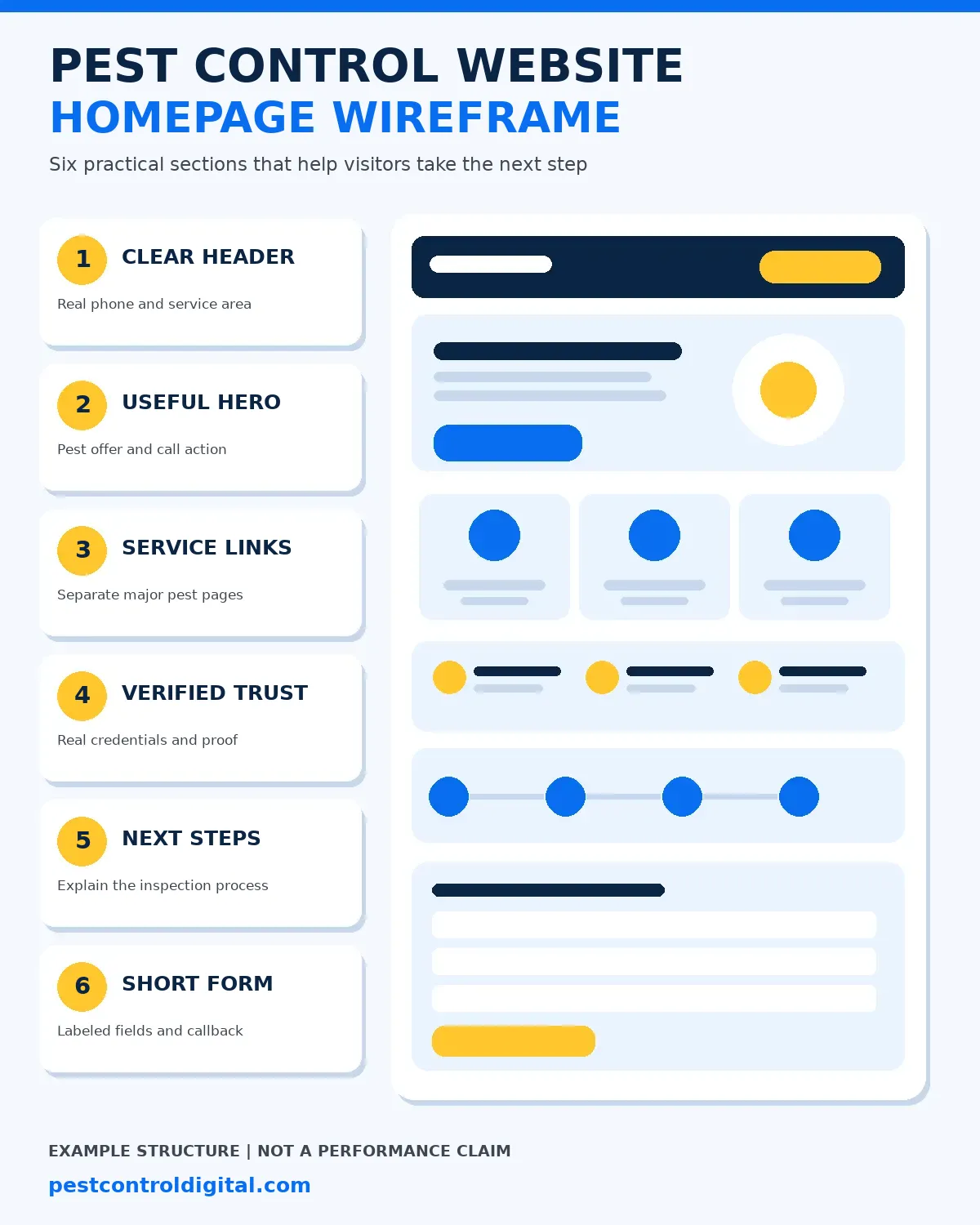
The homepage should explain which pest problems the company handles and how customers can request help. Use a concise headline, short supporting sentence, prominent call button, and an alternative inspection form. Generic claims about being the best company in town do not establish service fit.
Below the opening section, show recognizable categories: termite inspections, rodent control, bed bug treatment, mosquito programs, and general pest maintenance. Each category should link to a page that explains what happens next. Avoid vague labels that make customers guess.
Describe the process plainly: explain the concern, confirm the address, arrange an assessment, and receive a recommendation. Show real photos only when permitted. Display licensing, insurance, and service qualifications only when verified.
Keep navigation restrained. Home, Services, Areas Served, About, Reviews, and Contact may be enough as top-level choices. Deep dropdowns full of duplicated city names can make an urgent task harder.
Give major pest services their own useful pages
A homeowner seeing termite damage needs different information from someone hearing scratching in an attic. A single page listing every pest cannot explain both concerns well. Build focused pages for services the company actually offers, describing symptoms, inspections, preparation, service options, and next steps.
A termite page can explain the inspection process and how findings are communicated. A rodent page can distinguish trapping from entry-point assessment and exclusion. A bed bug page should not claim that a bite or photograph alone proves an infestation.
Include actual geographic coverage without mass-producing nearly identical pages for every suburb. If the business dispatches from one location, explain the true route area. See the pest control SEO guide and Google Business Profile checklist for related visibility considerations.
Match each call to action to the service. A termite inspection request may need different information from a recurring mosquito treatment quote. A visitor should never have to navigate back to the homepage to contact the company.
Make calling and booking easy on a phone
Many pest concerns start with a homeowner holding a phone near a damaged cabinet, attic hatch, or bedroom. The mobile layout should work with one hand. Keep the call action obvious, use a working telephone link, and avoid overlays that hide important content.
Offer a short form for visitors who cannot call immediately. Ask for name, contact details, service ZIP code, pest concern, and a brief message. Label each field, identify required fields, and explain when the office expects to respond.
Test the entire journey: tap the phone button, submit a valid form, trigger a validation error, and confirm that the success message appears. Check whether staff receive the request. A visually attractive form that silently fails is a business problem.
The W3C recommends properly associated form labels so people and assistive technology can identify fields. Provide visible focus states, readable contrast, and alternatives to chat-only booking. Test on actual phones rather than trusting a desktop preview.
Use this page-by-page pest control website checklist
A project is easier to price and review when every page has a defined job. The table below is a planning checklist, not a forecast of how many calls any page will produce. Smaller companies can combine pages if the information stays clear.
| Page | Question to answer | Primary action |
|---|---|---|
| Homepage | Which pests and areas do you serve? | Call or request an inspection |
| Pest service page | What happens during the service process? | Request pest-specific help |
| Areas served | Is the customer’s address in range? | Check availability |
| About and credentials | Who does the work and what is verified? | Contact the team |
| Reviews and proof | What genuine evidence is available? | Explore services |
| Contact page | How and when can customers reach you? | Send an inquiry |
| Commercial services | Can you support recurring property needs? | Request a consultation |
Write the service copy before choosing a visual template. If a page cannot explain what customers receive, new colors will not solve the problem. For paid campaigns, a dedicated pest control landing page may be better than sending every visitor to the homepage. Our landing page layout and tracking guide explains the next steps.
Avoid separate pages for every possible pest-and-city combination unless each has a distinct, useful purpose. Thin pages with swapped place names add maintenance work and rarely help a homeowner make a decision.
Show trust without inventing credentials or results
Customers may be allowing a technician into their home, so credibility matters. Show the registered business name, real contact details, service process, and actual team when permission is available. Explain inspections and estimates in language a homeowner understands.
Licensing rules vary by state and treatment. Verify license numbers and certifications against company records or regulators before displaying them. Avoid badges suggesting an endorsement the company does not have. Never manufacture reviews, ratings, awards, or technician biographies.
If you have a documented project, explain its context and limits. Pest Control Digital’s case studies page describes an Orlando search-visibility example, but impressions and clicks are not confirmed jobs. Keep that distinction clear when presenting evidence.
Describe real service areas without inventing office locations. If the business does not receive customers at its dispatch address, do not imply it operates a walk-in showroom. A clear coverage statement helps visitors more than unsupported map pins.
Make the site fast, accessible, and indexable
Google uses the mobile version of website content for indexing and recommends responsive design because it is easier to maintain. Keep useful service details accessible on mobile. Prioritize readable text, stable layouts, and buttons that are easy to tap.
Core Web Vitals measure loading, interaction, and visual stability. Google’s published good thresholds are Largest Contentful Paint at 2.5 seconds or less, Interaction to Next Paint at 200 milliseconds or less, and Cumulative Layout Shift at 0.1 or less, evaluated at the 75th percentile. These are experience targets, not ranking or booking guarantees.
| Metric | Good threshold | What to inspect |
|---|---|---|
| Largest Contentful Paint (LCP) | 2.5 seconds or less | Main image and server response |
| Interaction to Next Paint (INP) | 200 milliseconds or less | Menu, form, and call interactions |
| Cumulative Layout Shift (CLS) | 0.1 or less | Image dimensions and dynamic elements |
Compress images, remove unnecessary scripts, and keep contact options functional when optional widgets fail. Verify HTTPS, canonical URLs, crawlable navigation, and the absence of accidental noindex tags. Compare real mobile behavior with lab tests.
Review Google’s mobile indexing guidance and the W3C form-label tutorial when specifying the build.
Measure booked inspections, not only website clicks
Measure the journey from first visit to meaningful contact. Track tap-to-call events, form submissions, and connected call outcomes where appropriate. A click on the phone number does not prove the call was answered, and a form submission does not prove a customer booked.
Give the office simple lead statuses: new, contacted, qualified, inspection scheduled, completed, and not a fit. Separate termite, rodent, bed bug, and recurring-service inquiries to identify where the website sets the wrong expectation.
Consider an illustrative example, not an industry benchmark. If 30 form inquiries lead to 12 qualified conversations and 5 booked inspections, the booking rate from all form inquiries is about 16.7%. Use actual office records to replace these hypothetical figures.
Connect analytics to a practical pest control conversion tracking plan. Review unanswered calls and slow callbacks before blaming the website for every missed job. Prioritize changes by qualified booking impact rather than visual preferences.
When should you improve the site instead of rebuilding?
A full rebuild is not always the best first investment. If the existing site is secure, editable, indexable, and has useful service pages, targeted improvements may fix the immediate problem. Repair broken forms, unclear navigation, weak calls to action, and slow images first.
A rebuild becomes more reasonable when the platform is unsupported, difficult to secure, impossible for staff to update, or structurally unable to support the required pages. Preserve valuable content, plan redirects for changed URLs, and check Search Console after launch.
Use a written acceptance checklist: working forms, mobile usability, accurate business details, analytics, speed, metadata, redirects, accessibility basics, and staff training. Compare that scope with the pest control website redesign service.
Choose the least disruptive approach that fixes verified problems and makes incoming work easier to manage.
How Pest Control Digital helps
Pest Control Digital can review a company’s service pages, mobile contact path, technical issues, and tracking before recommending a design scope. Our pest control website design service focuses on useful pages and clear next steps rather than visual effects alone.
Start with an audit if you are unsure where visitors abandon the process. The AI visibility checker offers a supplementary view of how clearly a business appears online, but it does not replace booking and call records.
Frequently asked questions
What pages does a small pest control company need?
Start with a homepage, pages for your actual major services, an honest areas-served page, About, and Contact. Add commercial or recurring-service pages when those are real offers. Avoid thin pages made solely to target more keywords.
Should the website have a call button or a form?
Usually both. Some customers want to speak with dispatch, while others need to send details outside office hours. Test that the call button reaches the right number and every form is received. State the expected response window.
Can a redesign improve Google rankings?
A redesign may remove technical or usability barriers, but it cannot guarantee rankings. Preserve valuable URLs and content, repair crawl and mobile problems, and measure results after launch. Broken redirects or deleted useful pages can harm visibility.
How much text should a pest service page contain?
Enough to answer the customer’s questions without filler. Explain signs, service eligibility, inspection steps, preparation, and what happens next. The right length varies by pest and service. Clear original information matters more than a fixed word count.
What makes a pest control website trustworthy?
Accurate business details, verifiable qualifications, a clear service process, genuine photos when available, and transparent contact options help visitors assess a provider. Do not display fabricated reviews, unsupported license badges, or promises that every infestation can be solved immediately.
How do I know whether my website generates jobs?
Connect inquiries to office records. Track answered calls, qualified forms, scheduled inspections, completed work, and source where available. Website traffic and clicks are useful diagnostics, but they are not the same as confirmed booked jobs.
Is your website helping customers book?
Get a practical review of mobile usability, service pages, and contact paths.